

How To Generate 1000 Product Photos With AI In One Day 2026 Guide
Generating 1000 product photos with AI in one day is no longer a futuristic dream but a tangible reality for modern e-commerce businesses. This revolutionary approach leverages artificial intelligence to create high-quality, diverse product imagery at an unprecedented scale and speed. By automating the traditionally time-consuming and expensive process of product photography, businesses can rapidly populate their online stores, test various visual styles, and maintain a competitive edge. This article will guide you through the strategies and tools necessary to achieve such ambitious production targets using AI.
Streamlining AI Product Photo Automation for Dropshipping Stores
Achieving 1000 product photos with AI in one day is highly feasible for dropshipping stores by implementing robust AI product photo automation for dropshipping stores. This automation involves using AI platforms that can generate diverse product images from basic inputs, significantly reducing manual effort and time. AI product photo automation refers to the use of artificial intelligence software to automatically create, edit, and optimize product images for e-commerce platforms, often from minimal source material.
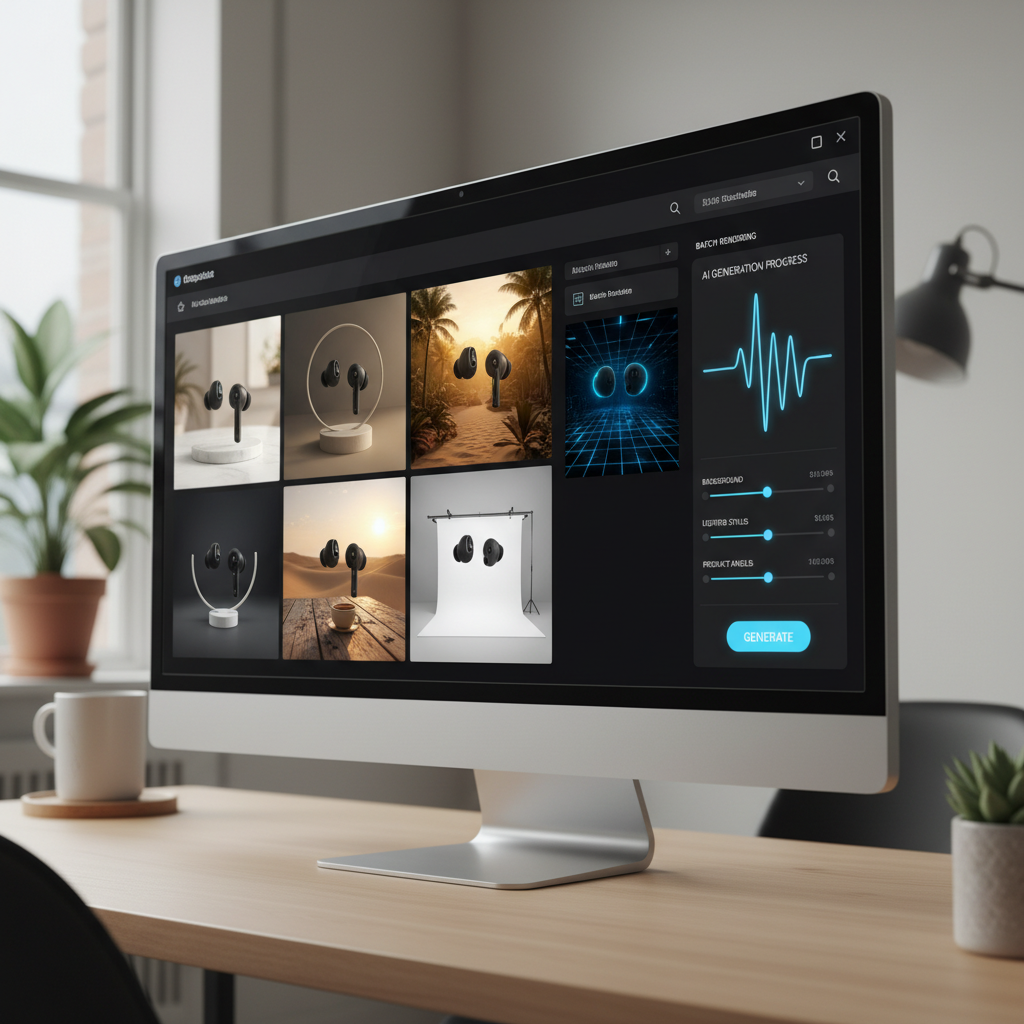
The speed and efficiency gained allow dropshippers to quickly update their catalogs with fresh visuals. This is crucial for testing new products and adapting to market trends. Automation helps maintain a consistent brand aesthetic across a large inventory.
Choosing the Right AI Platform for High-Volume Generation
Selecting an appropriate AI platform is the first critical step for high-volume product image generation. Look for platforms offering scalable infrastructure and diverse customization options. Key features include batch processing capabilities and a wide range of stylistic presets. These platforms often leverage advanced generative adversarial networks (GANs) or diffusion models. They can produce realistic images from text prompts or existing product photos.
Consider the following when evaluating platforms:
* Scalability: Can it handle thousands of requests per day without performance degradation?
* Customization: Does it offer options for backgrounds, lighting, shadows, and product angles?
* Integration: Can it connect with your existing e-commerce ecosystem?
* Cost-effectiveness: Evaluate pricing models based on your expected volume.
Preparing Your Product Data for AI Image Creation
Effective AI image generation relies heavily on well-prepared product data. This typically involves high-quality source images and detailed product descriptions. Even a single good product shot can be transformed into hundreds of variations by AI. Ensure your existing product images are clear, well-lit, and isolated if possible.
For optimal results, provide the AI with specific instructions or prompts. This might include desired backgrounds, lighting conditions, and specific scenarios. For instance, “a ceramic mug on a rustic wooden table with soft morning light” will yield better results than just “a mug.” Standardizing your product data inputs will streamline the entire automation process. This consistency ensures the AI generates images that align with your brand guidelines.
Leveraging Zapier for AI Product Image Automation in Shopify Stores
You can generate 1000 product photos with AI in one day for Shopify stores by integrating AI image generation tools with Zapier. This powerful combination enables seamless Zapier AI product image automation for Shopify stores, connecting various applications to create efficient workflows. Zapier AI product image automation for Shopify stores involves setting up automated triggers and actions within Zapier to generate product images using AI tools and then upload them directly to your Shopify product listings.
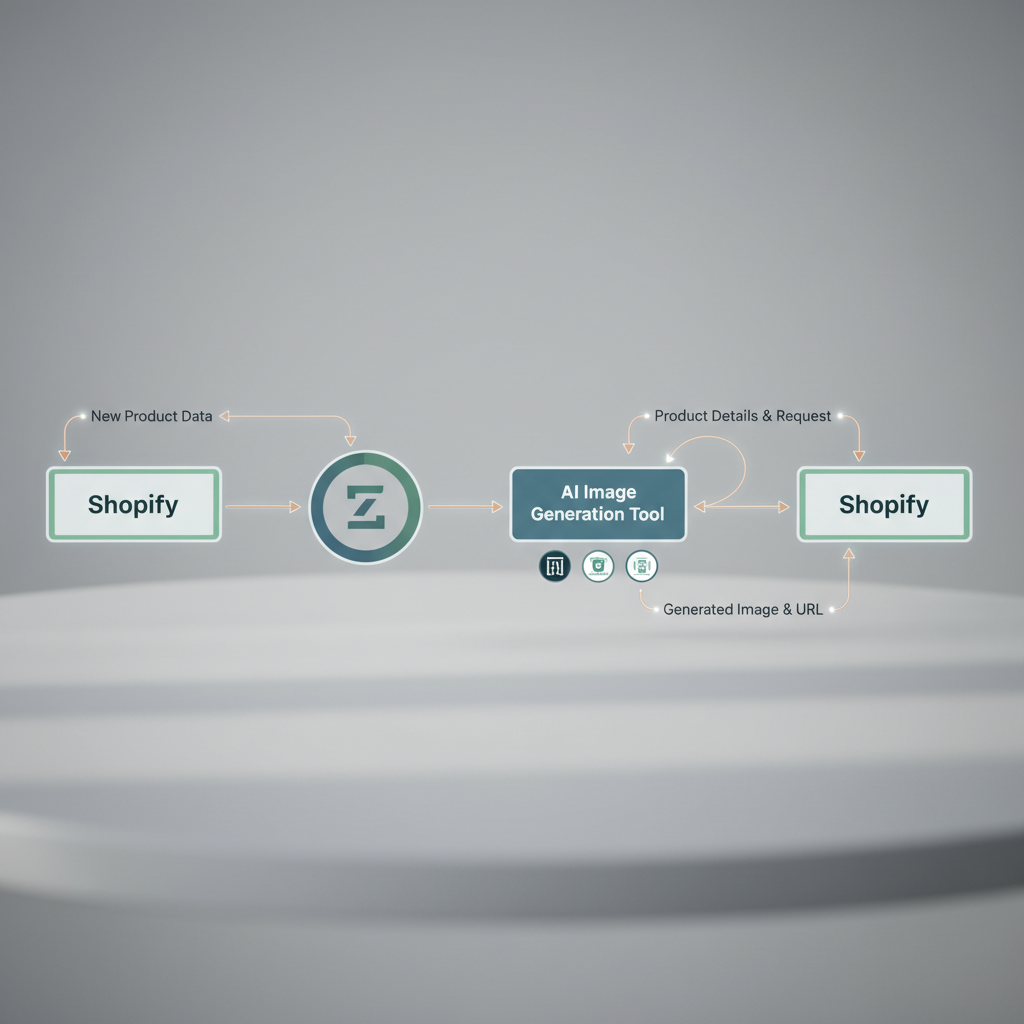
This automation eliminates manual image uploading and linking. It drastically speeds up the process of launching new products or refreshing existing ones. Shopify store owners can focus on marketing and sales while AI handles visual content creation.
Setting Up Zapier Workflows for Seamless Integration
Setting up Zapier workflows for AI product image automation involves defining triggers and actions. A common trigger could be a new product added to Shopify. The action would then be sending product details to an AI image generation tool. Once the AI tool processes the request and generates images, another action can upload these images back to the corresponding Shopify product.
Here’s a simplified workflow example:
1. Trigger: New Product in Shopify.
2. Action 1: Send product title, description, and base image URL to an AI image generation API (e.g., Midjourney, DALL-E 3, or a specialized product photography AI).
3. Action 2: (After AI generation) Receive generated image URLs.
4. Action 3: Update Product in Shopify with new image URLs.
This chain of events can be customized to include multiple AI tools or additional steps like image resizing or watermarking. The beauty of Zapier is its flexibility in connecting hundreds of apps.
Optimizing AI Outputs for Shopify Product Pages
Optimizing AI-generated images for Shopify product pages is crucial for conversion and site performance. High-quality images attract customers, but oversized files can slow down your store. Ensure the AI tool generates images at appropriate resolutions. Shopify recommends images be 2048 x 2048 pixels for square product images.
Consider these optimization tips:
* File Format: Use WebP or JPEG for optimal balance between quality and file size.
* Alt Text: Automate the generation of descriptive alt text for SEO and accessibility. Many AI tools can now assist with this.
* Consistency: Maintain a consistent style and background across all product images. This enhances the professional look of your store.
* Variations: Generate multiple angles and lifestyle shots for each product. This provides customers with a comprehensive view.
Implementing API-First AI Product Photography for Headless Ecommerce
Generating 1000 product photos with AI in one day is perfectly suited for headless e-commerce architectures through API-first AI product photography for headless ecommerce. An API-first approach means that the primary way to interact with your AI product photography system is through its Application Programming Interface (API). This allows for maximum flexibility and scalability in how product images are generated and delivered.
API-first AI product photography for headless ecommerce 2026 refers to leveraging AI-powered image generation tools primarily through their APIs to create, manage, and distribute product visuals within a decoupled e-commerce architecture. This method ensures seamless integration and high performance. Headless e-commerce platforms thrive on flexible content delivery. AI-generated images can be programmatically requested and served across various front-ends. This includes websites, mobile apps, and social media channels.
Designing Your API Integration for Scalable Image Generation
Designing a robust API integration is fundamental for scalable AI image generation in a headless environment. Your integration should handle high volumes of requests efficiently. It must also manage the asynchronous nature of image generation tasks. Consider using a microservices architecture to isolate the image generation process. This prevents it from impacting other parts of your e-commerce system.
Key considerations for API design:
* Asynchronous Processing: Image generation can take time. Implement webhooks or polling mechanisms to notify your system when images are ready.
* Batch Requests: Allow for sending multiple product image generation requests in a single API call. This reduces overhead.
* Error Handling: Implement robust error handling and retry mechanisms. This ensures no requests are lost.
* Authentication: Secure your API endpoints with appropriate authentication methods (e.g., API keys, OAuth).
Managing and Delivering AI-Generated Images in Headless Setups
Once AI-generated images are created, efficient management and delivery are crucial for headless setups. A Content Delivery Network (CDN) is essential for fast global distribution. Store your images in a cloud storage solution like AWS S3 or Google Cloud Storage. These services offer high availability and scalability.
Implement a Digital Asset Management (DAM) system to organize and tag your AI-generated images. This makes them easily discoverable and reusable across different platforms. Your headless CMS can then pull these images directly from the DAM or CDN. This ensures that the correct image variations are displayed on each front-end. Version control for images is also important. This allows you to revert to previous versions if needed.
Integrating AI Product Photo Generation with Webhooks for WooCommerce
To generate 1000 product photos with AI in one day for WooCommerce, integrating AI product photo generation with webhooks is a highly effective strategy. This approach allows for real-time updates and automation, significantly accelerating the image creation workflow. An AI product photo generation webhook integration for WooCommerce means setting up automated notifications (webhooks) that trigger an AI image generation service whenever a specific event occurs in your WooCommerce store, such as a new product being added.
This method ensures that new product listings are immediately accompanied by high-quality, AI-generated visuals. It eliminates manual intervention and speeds up product launches. WooCommerce store owners can maintain a dynamic and visually rich product catalog with minimal effort.
Configuring Webhooks for Real-Time Image Updates
Configuring webhooks in WooCommerce to trigger AI image generation involves setting up a listener for specific events. The most common event is “product.created” or “product.updated.” When this event occurs, WooCommerce sends a payload of data to a specified URL. This URL belongs to your AI image generation service or an intermediary automation platform.
Here’s how to set up a webhook in WooCommerce:
1. Navigate to WooCommerce > Settings > Advanced > Webhooks.
2. Click “Add webhook.”
3. Fill in the details:
* Name: A descriptive name (e.g., “AI Image Generator”).
* Status: Active.
* Topic: Select “Product created” or “Product updated.”
* Delivery URL: The endpoint of your AI image generation service or an automation tool like Zapier/Make.
* Secret: (Optional) A key to sign webhook payloads for security.
The AI service receives the product data (e.g., title, description, existing image URL). It then generates new images based on predefined templates or prompts.
Automating Image Uploads and Product Assignments in WooCommerce
After the AI service generates the images, the next step is to automate their upload and assignment to the correct WooCommerce products. This typically involves the AI service sending back image URLs to another webhook endpoint or directly to a custom plugin. A custom plugin or a Zapier/Make integration can then use the WooCommerce REST API to attach these images to the product.
Consider the following for automation:
* API Credentials: Ensure your integration has the necessary WooCommerce API keys with read/write permissions.
* Image Association: The AI service must return a product identifier (e.g., SKU or product ID) with the generated images. This allows for correct assignment.
* Image Gallery: Automate the addition of multiple generated images to the product gallery. This provides customers with diverse views.
* Featured Image: Set one of the AI-generated images as the featured image for the product.
This seamless flow from product creation to image generation and assignment drastically reduces the time to market for new products.
Best Practices for Scaling AI Product Photo Production
Scaling AI product photo production to generate 1000 images in one day requires adherence to several best practices. These ensure efficiency, quality, and cost-effectiveness. The core principle is to optimize every stage of the workflow. This ranges from data input to image output and management.
Quality Control and Consistency in AI-Generated Images
Maintaining quality and consistency is paramount, even at high volumes. While AI can generate images rapidly, human oversight remains crucial. Implement a systematic review process for a sample of generated images. This helps identify and correct any recurring issues. Consistency across your product catalog builds brand trust and improves the customer experience.
Strategies for quality control:
* Define Clear Prompts: Provide specific and detailed prompts to the AI. This minimizes misinterpretations and ensures desired aesthetics.
* Style Guides: Develop a comprehensive style guide for your AI image generation. This includes preferred backgrounds, lighting, angles, and overall mood.
* Batch Review: Instead of reviewing every single image, review a statistically significant sample from each batch.
* Feedback Loop: Provide continuous feedback to the AI model or platform. Many advanced AI tools learn from user corrections.
| Aspect | Manual Photography | AI-Generated Photography |
|---|---|---|
| Cost per Image | High (equipment, studio, photographer) | Low (subscription, API calls) |
| Time per Image | Hours/Days (shoot, edit) | Seconds/Minutes (generation) |
| Scalability | Limited by resources | Highly scalable (cloud-based) |
| Consistency | Challenging to maintain | Easy to enforce with templates/prompts |
| Diversity | Requires multiple setups | Easy to generate variations |
Batch Processing and Resource Management for Large Volumes
Batch processing is fundamental for generating 1000 product photos with AI in a single day. Instead of processing images one by one, group similar products or products requiring similar visual treatments. This optimizes AI resource usage and reduces processing time. Efficient resource management also involves understanding the computational demands of your chosen AI platform.
Tips for batch processing and resource management:
* Prioritize Products: Process high-priority or best-selling products first.
* Schedule Off-Peak: If your AI service has usage tiers, schedule large batches during off-peak hours to potentially save costs or improve speed.
* Monitor Usage: Keep an eye on your API call limits and processing quotas. This prevents unexpected interruptions.
* Data Compression: Optimize source data (e.g., input images) to be as small as possible without losing critical detail. This speeds up data transfer.
Advanced AI Techniques for Unique Product Visuals
Beyond basic product shots, advanced AI techniques can help generate 1000 product photos with AI in one day that are truly unique and captivating. These methods leverage the full creative potential of AI. They move beyond simple background removal to create entire scenes and lifestyle images.
Customizing Prompts for Specific Product Aesthetics
The quality and uniqueness of AI-generated images largely depend on the prompts provided. Customizing prompts allows you to guide the AI towards specific aesthetics, moods, and styles. This is particularly useful for products that require a distinct brand identity. Experiment with descriptive adjectives, artistic styles, and emotional cues.
For example, instead of “a watch,” try:
* “A luxury minimalist watch on a marble pedestal, soft studio lighting, high fashion photography.”
* “A rugged outdoor watch against a mountain backdrop at sunset, adventurous and dynamic.”
* “A vintage-inspired watch on a worn leather journal, warm, nostalgic lighting.”
Iterate on your prompts. Small changes can lead to significant differences in the output. Many AI tools allow for prompt weighting. This emphasizes certain elements over others.
Utilizing AI for Lifestyle and Contextual Product Shots
AI is exceptionally powerful for generating lifestyle and contextual product shots. These images show products in use or in a relevant environment. They help customers visualize themselves using the product. This can significantly boost engagement and conversion rates. Instead of just a white background, AI can place your product in a living room, a café, or a natural landscape.
Steps for generating lifestyle shots:
1. Define the Scene: Describe the environment, time of day, and overall mood.
2. Integrate the Product: Specify where and how the product should appear within the scene.
3. Add Human Elements (Optional): AI can also generate realistic human models interacting with the product.
4. Refine with Iterations: Generate several versions and refine prompts based on the best results.
This capability allows businesses to create a vast library of diverse marketing materials. These would be prohibitively expensive and time-consuming to produce through traditional photography.
How quickly can AI generate product photos?
AI can generate product photos incredibly fast, often in seconds or minutes per image, depending on complexity and server load. Batch processing allows for hundreds or thousands of images to be created within a single day. This speed is a major advantage over traditional photography methods.
Is AI product photography suitable for all product types?
AI product photography is suitable for most product types, especially those with clear forms and textures. Highly complex or extremely intricate items might require more detailed prompting or initial high-quality source images. However, AI capabilities are rapidly improving across all categories.
What are the main benefits of using AI for product photos?
The main benefits include significant cost reduction, accelerated production times, unparalleled scalability, and the ability to generate diverse visual variations. AI also allows for rapid testing of different visual styles and backgrounds without expensive reshoots.
Can AI generate images with specific brand aesthetics?
Yes, AI can be trained or prompted to adhere to specific brand aesthetics. By providing detailed style guides, example images, and precise textual prompts, you can guide the AI to produce images that align perfectly with your brand’s visual identity and tone.
Do I need technical skills to implement AI product photo automation?
Basic technical understanding is helpful, especially for API or webhook integrations. However, many AI platforms offer user-friendly interfaces, and automation tools like Zapier simplify complex workflows. Non-technical users can still achieve significant automation with readily available tools.
How does AI handle image rights and ownership?
Image rights and ownership for AI-generated content vary by platform and jurisdiction. Most commercial AI image generators grant users a license to use the generated images for commercial purposes. Always review the terms of service of the specific AI tool you are using to understand your rights.
The ability to generate 1000 product photos with AI in one day marks a significant paradigm shift in e-commerce. Businesses can now scale their visual content creation to unprecedented levels, unlocking new opportunities for growth and market penetration. By embracing AI automation, companies can:
* Drastically reduce photography costs and time-to-market.
* Achieve consistent, high-quality visuals across vast product catalogs.
* Rapidly test and iterate on different visual marketing strategies.
* Free up resources to focus on core business operations.
Implementing the strategies outlined, from leveraging Zapier for Shopify to API-first approaches for headless commerce and webhook integrations for WooCommerce, empowers businesses to fully harness AI’s potential. The future of e-commerce visuals is automated, intelligent, and incredibly efficient. Start exploring AI product photography today to transform your online presence.